What is a wiki?
A wiki is a topic which is able to be edited by many people. Usually, only the person who posts a topic or a moderator can edit a topic. They have an obvious light blue background.
Wikis are powerful collaboration tools which enable multiple people to contribute to and continuously improve a living document. For example, this may be used to develop a national guideline rapidly in the face of a new challenge (such as rapidly evolving COVID-19 situations).
The most obvious use of wikis in modern life is Wikipedia, which has used this technology to revolutionise the encyclopedia industry. Here is their definition of a wiki:
How to make your post a wiki
Discourse will also automatically grant you the ability to do this once you have used the platform quite a bit and have become a full Member (i.e. Trust Level 2). After you have written your post, you will see a spanner icon on the far right under your post that you can click on: 
For more information about wiki posts
See the detailed guide in the Discourse support forum:
How do I edit an existing wiki?
Wiki posts have a light teal background to make them obvious and say  in the top right - just like this one (although it might be green if it hasn’t changed in a while). If you click on this, you will see the history of the edits, and @moderators can roll back any changes if need be.
Look for the Edit button in the bottom right corner. Once you have clicked on it, you’ll note that it looks like any other post.
There might be some slightly fancy markdown in there which can take a bit of getting used to. The way that the post appears is shown on the right. If you need more space to see what you are doing, click on the  (top right) and you’ll get a full page view. To save, you’ll have to shrink it back to normal size first.
What happens if two people edit at once?
Unfortunately, Discourse doesn’t handle this brilliantly. The first one to save will ‘win’ and the other one misses out. It does however tell you what is going on. If you get a notice telling you that someone else is editing the same post, we suggest waiting until they are done before having a go yourself. If what you are doing has taken you some time, you might want to take a copy for some insurance!
 Shared Edits - collaborative editing in real-time
Shared Editing is an extension to wiki functionality. It allows multiple people to edit a post simultaneously. This is a feature of some online document editors (such as Google Docs and Office 365), and is a powerful way to work together.
This must be enabled on an existing wiki post by @moderators or those with Trust Level 4, and is brilliant for the following situations:
- Taking minutes for a meeting with multiple contributors
- Developing a document here in the DHN together with someone else while chatting about it on the phone
- Working on a co-authored blog (not something we’ve activate yet but we could without too much trouble).
How to activate Shared Edits (@moderators only)
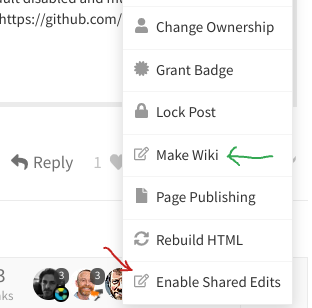
- Click on the spanner at the bottom right of the post
- then click on
Enable Shared Edits(red arrow)
- then click on
- While you are there, if it hasn’t already been made a wiki yet you can do that now too (green arrow)
 I recommend that you de-activate Shared Edits for that post when no longer needed so it reverts to standard wiki behaviour (less confusing for users)
For more info on Shared Edits see this: