Polls
Polls are vital in online community, to quickly gauge thoughts and promote engagement.
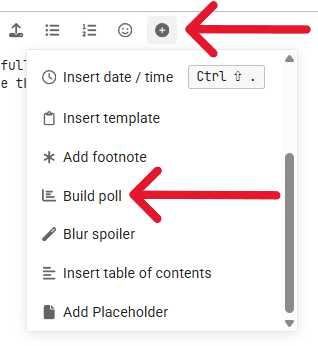
You find Build Poll behind the  icon on the Composer bar - it is pretty straightforward.
Here are some more detailed instructions if you need:
Doodle-esque Polls
You can modify a poll to create a ‘Doodle’-like poll. This is brilliant for arranging video (or physical) meetings. It is highly preferable to do this ‘in-house’, which promotes engagement and familiarity with the eHealth Forum (and you keep your data!).
If you are comfortable with markdown, you can simply skip to step 4, copy the code into your post, and modify it to suit.
Step 1 - Open a new post
Open the new Topic, Reply, or Message you want the poll to go in.
Step 2 - Create the poll
-
Create a Poll using the
Build Polloption from the Discourse composer toolbar, via the dropdown from the (options) menu.
-
Select
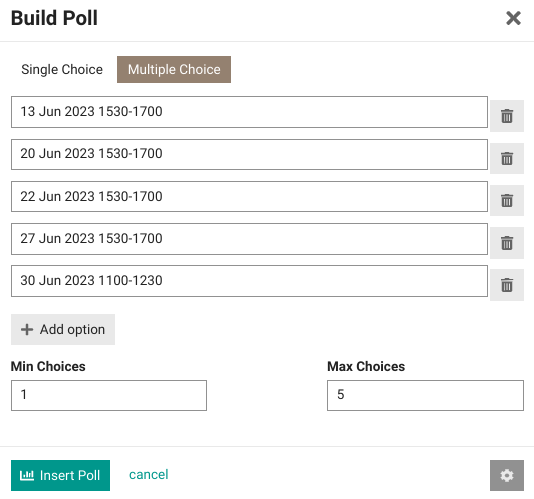
Multiple Choice -
Under Options, put in your date / time options, each on a separate line.
-
Put 1 in Min Choices and the number of choices in Max Choices. It should now look like this (don’t hit Insert Poll yet):
Step 3 - Tweak the Options
-
Hit the
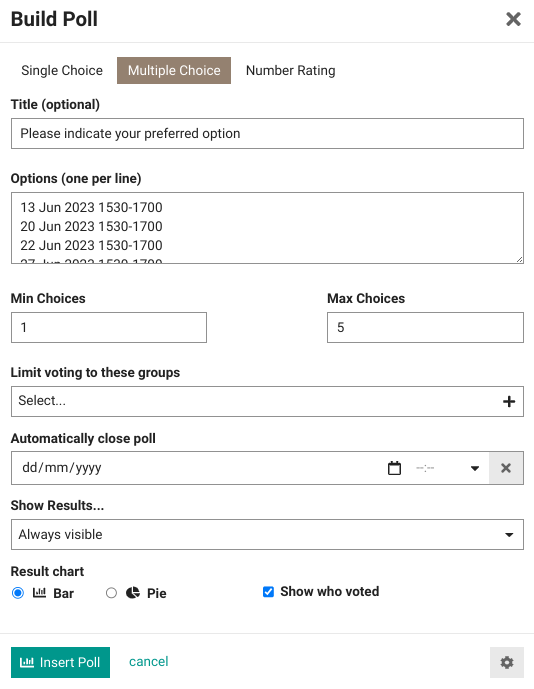
 button bottom right to reveal the advanced options
 -
Add a Title such as “Please indicate your preferred option” (Optional)
-
You can Limit voting to these groups or Automatically close poll if you wish (Optional)
-
Tick
 Show who voted so that people can see what other people have chosen. This is how it should look once complete:
Step 4 - Test it!
The markdown code in your post should look like this:
[poll type=multiple results=always min=1 max=5 public=true chartType=bar]
# Please indicate your preferred option
* 13 Jun 2023 1530-1700
* 20 Jun 2023 1530-1700
* 22 Jun 2023 1530-1700
* 27 Jun 2023 1530-1700
* 30 Jun 2023 1100-1230
[/poll]
You can tweak this direct in the Markdown if you wish / need to.
Poll appearance
Your poll should look like this:
- 13 Jun 2023 1530-1700
- 20 Jun 2023 1530-1700
- 22 Jun 2023 1530-1700
- 27 Jun 2023 1530-1700
- 30 Jun 2023 1100-1230
If you have any concerns, contact @moderators and ask for help.