The awesomeness of open source knows no bounds. An open-source video-conf platform called Jitsi (https://meet.jit.si) has been mentioned in threads before. However just a few days ago a Discourse team member, responding to the current crisis, wrapped it in a Discourse plugin theme component so Jitsi calling can be added easily to any existing Discourse topic or post.
How to use
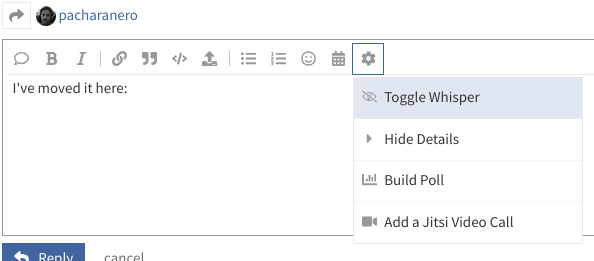
It adds an extra icon to the Composer toolbar under the ‘gear’, which allows a poster to add a Jitsi video call
Once the call has been added, anyone who can see that Topic can click the button that is visible in the thread
All the controls after that are inside the Jitsi frame, including options for chat, dial-in, full-screen, setting a privacy password and much more.
FAQ
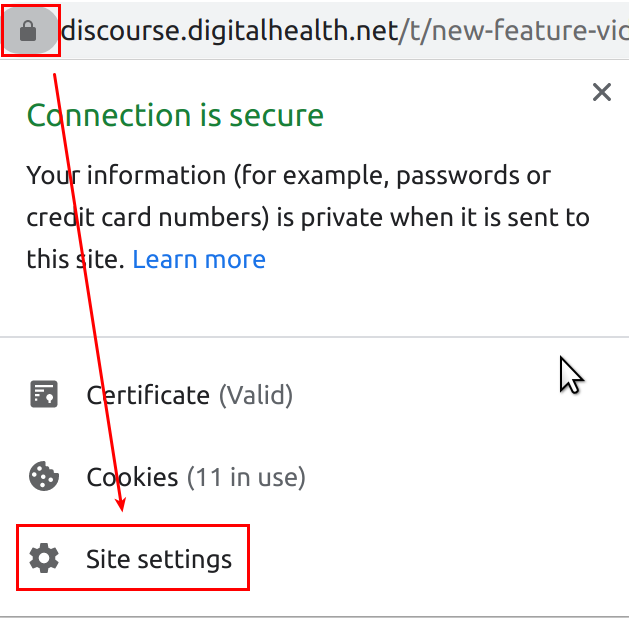
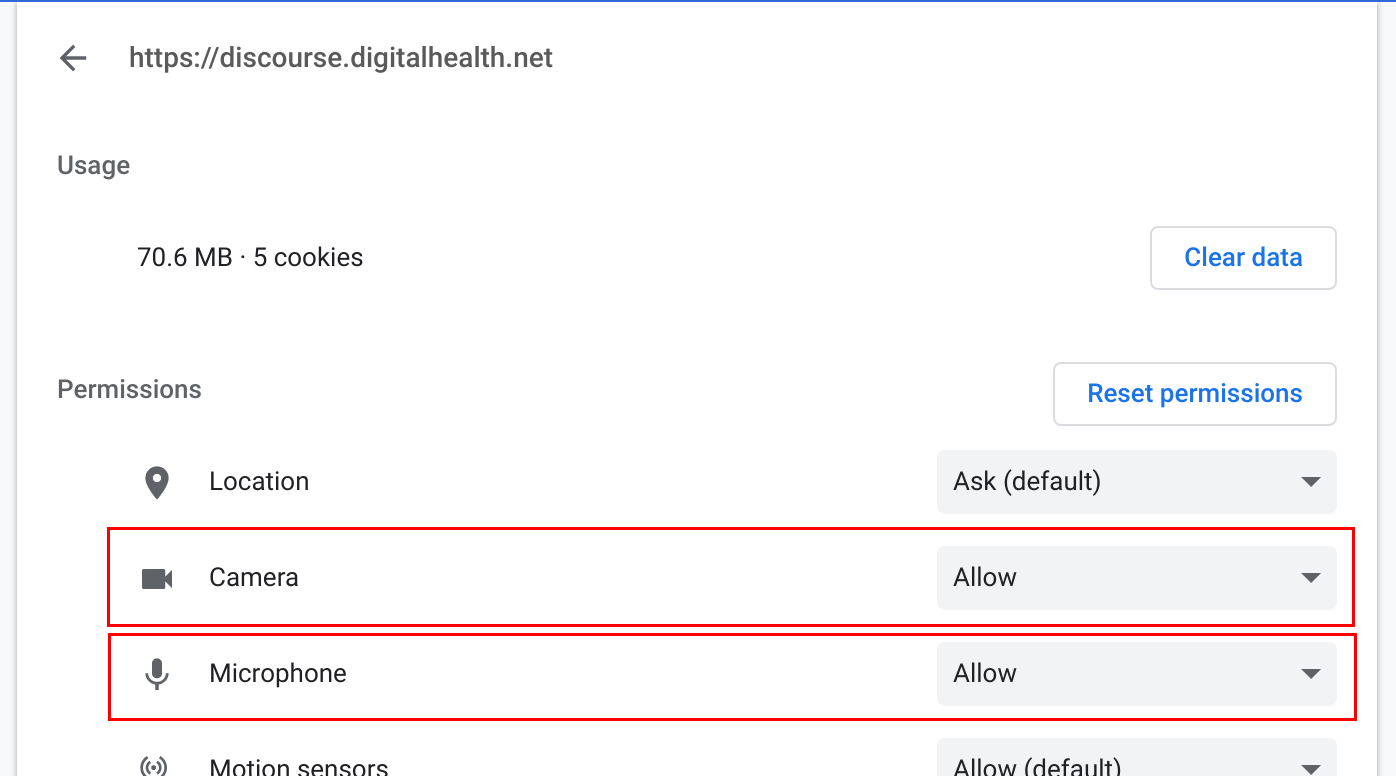
If you get problems with video not working, it is almost always due to your browser blocking cookies, popups or ‘AutoPlay’, so check these especially if you use a privacy-related browser addons, ad-blockers, etc
Bandwidth and server load. The video calling is handled completely outside of Discourse, so it’s not going to add any strain on the Discourse.
This is not instead of anything at this stage. If you have a Webex planned, it’s still a Webex now.
This is a new feature I have added which allows us to add audio/video calls to Discourse threads. Over time we could definitely use this for Networks calls like the Advisory Panels. But right now I just thought it would be handy for some users, especially if they are not yet enabled with Teams, don’t have NHSmail, or just simply want a solution that will still be free in 6 months’ time
To add a video call to a thread, you click on the gear and the option appears
A box pops up to let you choose a name for the room (it can be a new room or an existing one you created on https://meet.jit.si - if not alreay in existence it will be created for you)
Then the embed is created. Only one person needs to do this per Topic.
The embed button looks like this
Participants should click on that and they will all be connected to the same room, in a miniaturised version of the Jitsi window, embedded right in Discourse. (there is an option in the right-hand Jitsi menu to ‘full-screen’ the view)
If you get problems with video not working, it is almost always due to your browser blocking cookies, popups or ‘AutoPlay’ , so check these especially if you use a privacy-related browser addons, ad-blockers, etc
It seems to be very sensitive to privacy oriented browser plugins such as uBlock Origin, Brave Browser, etc
You need to allow all cookies for the discourse.digitalhealth.net domain
Feedback from our little test call just now was that Safari not as good as Chrome. Internet Explorer: no chance.
Brave Browser works fine when you turn off the mad privacy features. Firefox not yet tested.
So much important stuff now uses WebSockets that I’m afraid NHSD are going to have to change these filtering policies at least during this crisis. We have direct permission to use stuff like WhatsApp if there is no other suitable alternative. WebSockets are an important part of how stuff works now.
It would be a shame if NHSXs own guidance can’t be used in NHSD because of NHSDs filtering.
Yes, I had heard Edge was moving to the Chromium engine. Is anyone else concerned that loads of browsers (Chrome, Edge, Chromium, Brave, Vivaldi) and all apps that use the Electron framework - eg Slack, Atom, Teams all using the same Chromium codebase, is a risk? I am all for code reuse and even more all for open source, but a monoculture is worrying…
What do you think about moving the icon for Jitsi call instertion into the “gear” menu of the composer? It is a ‘power’ setting, so it seems sensible to make it a little more hidden. I’ve moved it there as a trial, tell me what you think.