Morning Networks!
In response to some feedback we’ve received about the volume of notifications on the Networks, I thought I’d do a quick guide to using the detailed features in Discourse to set your preferences for email notifications.
(After doing these changes, you can still access everything via the Discourse web app at discourse.digitalhealth.net, you just won’t get email notifications about all the posts that you have access to).
User Preferences
Your user preferences are accessed by clicking on your avatar at the top right, then the gear icon 
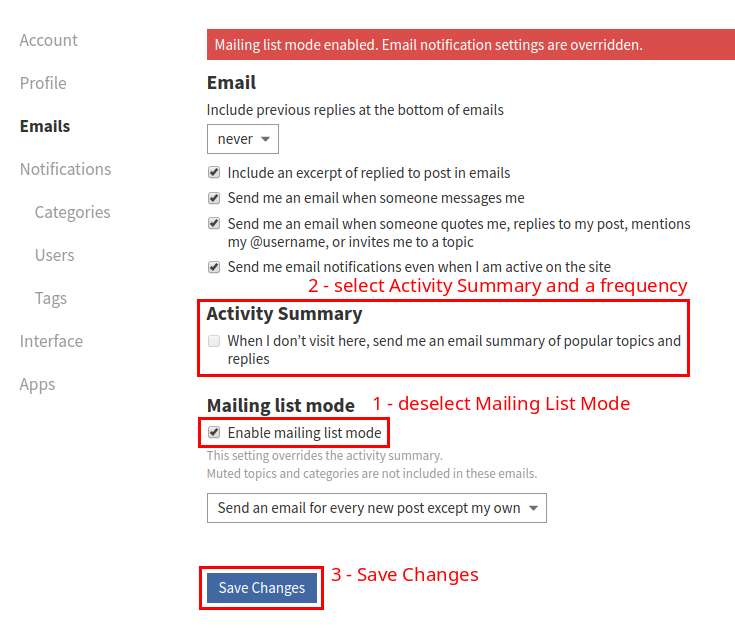
Select ‘Emails’ on the left sidebar, and then set your preferences as below:
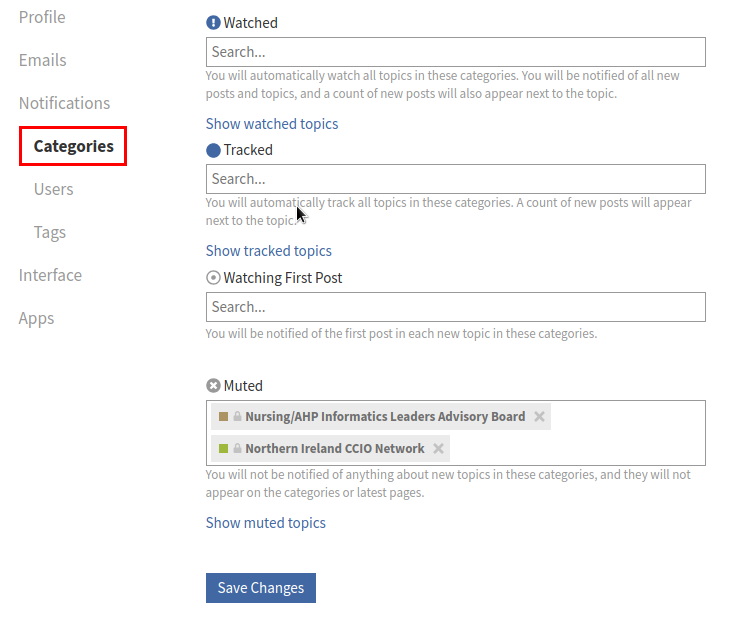
You can also use the Watching / Tracked / Muted features in the ‘Categories’ section to 'subscribe to only those sections you want to get notifications about.
Also worth highlighting here is that each notification will tell you why you are receiving it, and has an unsubscribe link, which will stop any further notifications for that topic.

Hopefully this will be useful to any of you struggling with the volumes of email notifications as the Networks have grown.
Marcus