Great to have you there. You will have so much to offer.
1 Like
@karenshaw would be great to have you there. can you see the appointment?
If you go up to the top of this topic (you can simply click on the title too) you will get the Event:
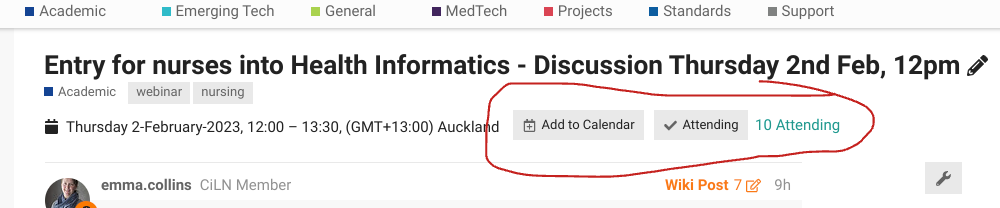
The 
Add to Calendar is pretty good, and you can RSVP by clicking on 
Attending (it goes turquoise when you are registered as attending).
We’ll have a super slick integration sometime soon so that you can simply subscribe once to the eHealth Forum calendar (either all or just those you RSVP ‘yes’ to) and get it automagically in your email calendar.
This one may be useful. It’s a matrix that a person can map themselves into https://digitalhealthcanada.com/wp-content/uploads/2019/12/Career-Matrix-One-Page-vDEC16-2019.pdf
Yes Kate, I have it in my calendar
Kind regards
1 Like
Morena
Looking forward to the meeting tomorrow at midday.
It will be recorded, but can someone please volunteer to perhaps take some notes/bullet points? Ideally, directly into this forum would be ideal.
Thanks
Emma
Morena everyone. @NathanK might be busy in theatre today, so I thought I would make myself available.
I am a physiotherapist in Northland and part of the ZUI team. If anyone has any trouble getting onto the ZUI meeting (pinned to the top of this thread) you can call me on: 0275 344 227.
I will be using this ZUI room if someone has any problems: https://zui.nz/sandpit
I am actually in https://zui.nz/sandpit right now, and until 12.15pm if anyone wants to jump in and test that your camera/mic is working etc.
While I am waiting I will pop in a couple of screen shots to show you what ZUI looks like so you can navigate easily - post coming soon…
1 Like
Hi again.
When you first click the link you should end up in the lobby (1).
Make sure you “allow” ZUI to access your camera and mic.
2: Type in your name.
3. Turn on camera and microphone. See the little “up arrows” - that might help you if there are other devices connected to your camera and microphone.
4. Join the meeting…
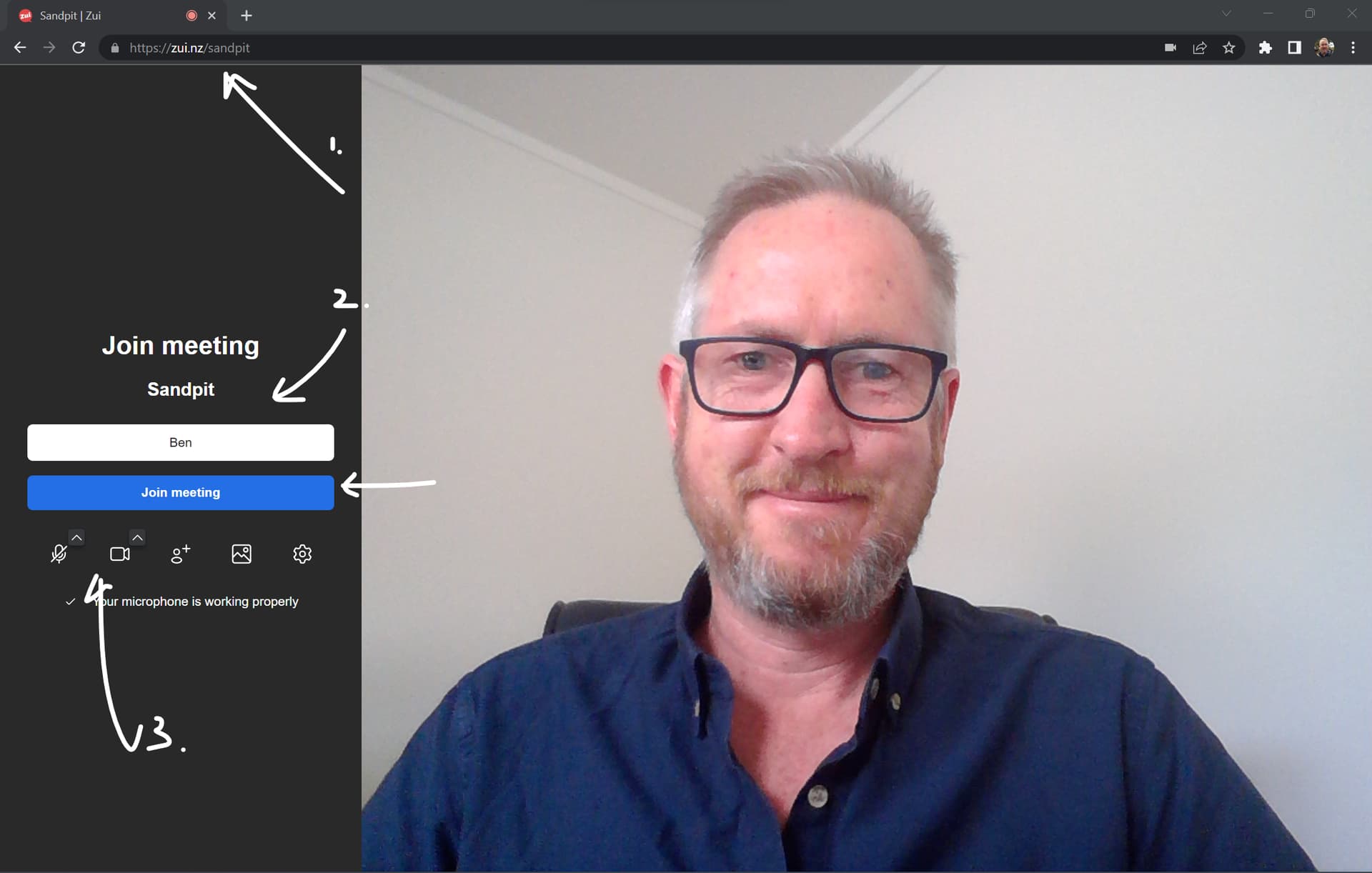
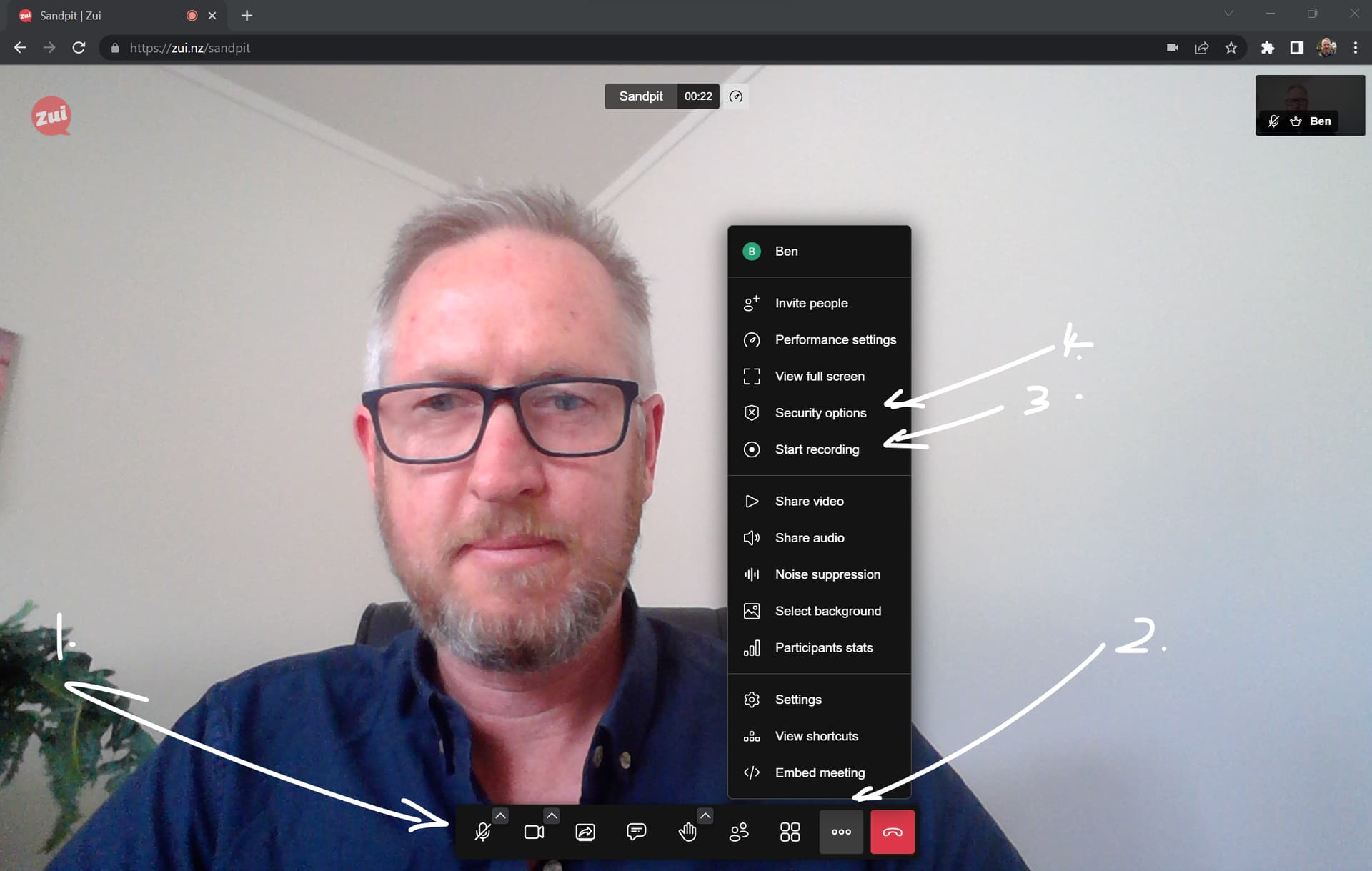
Once you join the meeting you should see this:
- Tool bar with the usual things: mic; camera; screen sharing; chat; raise your hand; invite people; gallery /solo view
- More options - this is where you can record the session to your local computer, and also enable other security options such as locking the lobby, so that someone has to knock to enter.
Good luck. Remember - call me on 0275 344 227 if you need any help.
PS - most common problems you might encounter are:
Kia ora @Ben_Gray I cant get in from Waikato , assume its the fire wall. Not sure how to describe it to them to get permissions.
Hello @Yeok.
Nathan held a ZUI last week with about 15 people and I understand 2 people from a DHB could not access it. He advised them to use an alternate internet source to get in - e.g. hotspot from a phone. I know this does not sound ideal and is a trade off for using a browser based video system if it is new to people.
EDIT - if coming in via phone - try turning off the WIFI which may be blocking ZUI.
Kate - drop me a call on 0275 344 227 for a quick talk about options.
@Yeok For future use ask them to add it their ‘white list’ of approved sites.
For now go with the mobile idea 
That is also being a pickle
1 Like
Ok - I am leaving the sandpit now. I hear from Nathan and Emma that the meeting is going well.
Sorry @Yeok that you had trouble today. I talked to Jon just now he said turning off the WIFI worked to get around the firewall for him on his phone. But we could have prepped a bit better regarding these issues.
I have been meaning to write a post on where ZUI came from - and I will.
But in a nutshell it was built as a community project last year in the initial Omicron outbreak. I was part of the Hikurangi Covid Response and we were supporting people in their homes with kai, RAT tests, medication deliveries, pulse oximeters and the like, and we wanted to use video for follow ups to check on people, maybe reassess their RAT test technique, or how they were using the oximeter.
Other options we were using required logging in, downloading software, or using social media tools. Or there was a time limit. So we wanted to create something that could be shared as a link via SMS - perhaps right there at someones doorstep on the first meeting, make sure it worked, and then use that to connect via video as they recovered.
I will write a full post on this another time soon. Cheers, Ben.
2 Likes
Kia Ora and thanks for the great discussion in todays meeting.
In my 10 year quest in Plunket to progress to a digital health role I took up every opportunity to be known internally. I had planned to complete the PG Cert in health Sciences, or even the PG cert in IT, but wasn’t ready to commit to losing my income to study.
To better position myself I did a couple of these online training courses, from the HINZ website.
https://www.hinz.org.nz/page/OnlineCourses
These were not formal qualifications, but solidified my knowledge & interest to know I was heading in the right direction, and showed initiative and learning outside the box, which would have helped me to get my new role as Business Analyst at Plunket.
My role will largely be planning improvements for systems and processes within Plunket (mostly in the digital space), which will influence practice, so I am hoping to maintain my APC, even though it not a nursing role.
3 Likes
You should be able to work with your lead nurses to do that. Well done. k
1 Like
Hi Team,
Where can I access the recording for the meeting? please
2 posts were merged into an existing topic: Entry for nurses into Health Informatics - Discussion Thursday 2nd Feb, 12pm
2 posts were split to a new topic: Clinical Digital Academy at Waitemata May 2023